Writing styles: AIDA, PAS, STAR and 15 more
18 styles, from persuasion to storytelling, for every text.
On this page
A writing style gives the AI a structure to follow: AIDA for a sales page, STAR for a case study, the Pyramid Principle for a report. HARPA offers 18 of them wherever it writes long text, and you can always type your own instructions instead.
| Command | Where you pick the style |
|---|---|
/article-creator | Before the outline is written |
/rewrite | WRITING FRAMEWORKS, to restructure your text |
/compose | ARTICLE, after the length (UNLIMITED hands over to Article creator) |
/outrank-article | After the article is written, to restyle it |
Each list starts with STANDARD, a plain article with headings and subheadings. Outrank article starts with MECE instead: sections that don't overlap and together cover the whole topic.
# Write an article in a style
Article creator writes long articles in parts, so nothing is cut off. Add it from the gallery once, then:
- Open HARPA (Alt+A on Windows, Ctrl+A on Mac), type /article-creator and press Enter.
- Pick ENTIRE ARTICLE, or ARTICLE SECTION to write one part from its title.
- Pick GENERATE OUTLINE and type the topic, or press Enter to take it from the open page. Have an outline already? Pick CUSTOM OUTLINE and paste it.
- Pick a style, or type your own instructions, like "friendly, for first-time buyers, short paragraphs".
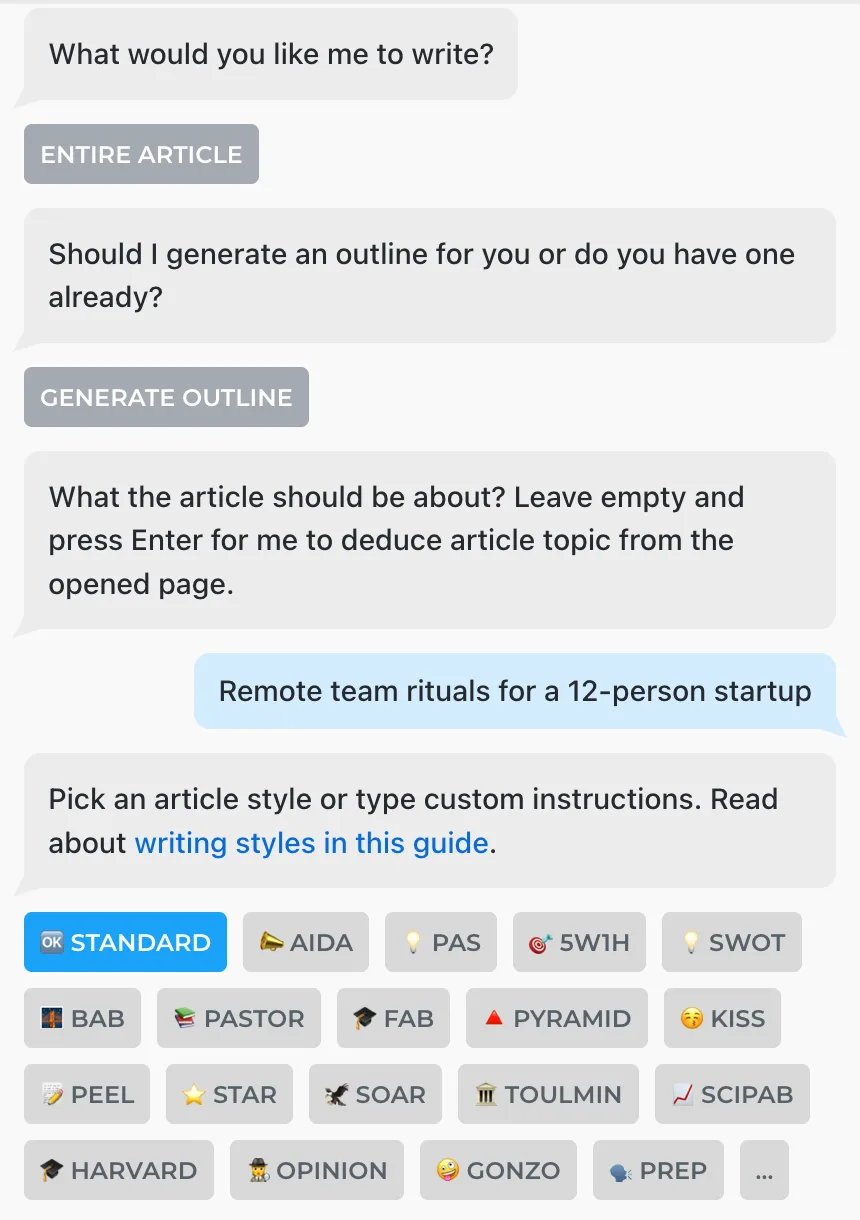
- Check the outline: OK, NEXT, or EDIT OUTLINE to change it.
- Add SEO keywords if you want them: YES, then LSI KW FROM SERP or PASTE MY KEYWORDS.
- Pick WRITE FIRST CHAPTER to write a long article chapter by chapter, or WRITE ENTIRE ARTICLE for a shorter one in one go.
- After each chapter: WRITE NEXT CHAPTER, REFINE, ADD KEYWORDS, ADD EXTERNAL LINKS, MIMIC MY TONE, SHOW ARTICLE or PASTE TO PAGE.
# Marketing and persuasion techniques
| Style | Structure | Use it for |
|---|---|---|
| AIDA | Attention, Interest, Desire, Action | Ads, sales letters, landing pages |
| PAS | Problem, Agitate, Solve | Persuasive posts and emails |
| BAB | Before, After, Bridge | Case studies, testimonials |
| PASTOR | Problem, Amplify, Solution, Testimonials, Offer, Response | Long sales pages, email campaigns |
| FAB | Features, Advantages, Benefits | Product pages, comparisons |
# Information and analysis techniques
| Style | Structure | Use it for |
|---|---|---|
| 5W1H | Who, What, When, Where, Why, How | News, explainers |
| SWOT | Strengths, Weaknesses, Opportunities, Threats | Business and market analysis |
| PYRAMID | The main point first, then the supporting details | Reports, executive summaries |
| KISS | Keep it simple: no jargon, short sentences | How-tos, wide audiences |
| PEEL | Point, Explanation, Evidence, Link | Arguments, essays |
# Storytelling and professional communication techniques
| Style | Structure | Use it for |
|---|---|---|
| STAR | Situation, Task, Action, Result | Interview answers, achievements |
| SOAR | Situation, Obstacles, Actions, Results | Stories of a problem solved |
| TOULMIN | Claim, Grounds, Warrant | Well-founded arguments |
| SCIPAB | Situation, Complication, Implication, Position, Action, Benefit | Business proposals |
| PREP | Point, Reason, Example, Point | Talks, short opinion pieces |
# Academic, opinion and creative writing styles
| Style | Structure | Use it for |
|---|---|---|
| HARVARD | Academic structure with headings and cited sources | Papers, essays, reports |
| OPINION | Your view, with arguments and other opinions on the topic | Op-eds, blog posts |
| GONZO | First person, facts mixed with the author's experience | Personal, memorable stories |
# Business analysis methods
You can also name an analysis method in any prompt or chat, like "Do a PEST analysis of this page":
- SWOT: Strengths, Weaknesses, Opportunities, Threats.
- PEST: Political, Economic, Sociocultural and Technological factors.
- STEEPLE: PEST plus Environmental, Legal and Ethical factors.
- SWOC: SWOT with Challenges instead of Threats.
- ABC analysis: ranks items by value into A (most important), B and C.
# Good to know
- A style is an instruction, not a template: the answer follows its structure, in the AI response language you set in Settings.
- Commands run on the model you pick in the chat. On HARPA's cloud models they use cloud credits, see Cloud models and credits.