AI-Driven Email Outreach Campaign
Enriches your existing name-email database and generates personalized outreach emails to promote your product or service.
All Grid API pages
On this page
# Features of this Email Campaign Scenario
All you need is your existing name-email database that can be uploaded to Google Sheets (if you don't have one, you can export relevant contacts from Hunter.io, Tomba.io, Dropcontact.io, findymail.com, Instantly or similar services).
-
If Google Sheets doesn't work for you, you can replace this module with Airtable or any other CRM solution.
-
After receiving an email, HARPA will scan corporate websites to gather information for targeted messaging.
-
The information will then update in your Google Sheets and generate a personalized email.
-
This can be sent through your preferred email service (you can switch the final module to Mailgun, Gmail etc., though the default option works with most providers).
# Pre-built templates:
It works with Gmail, Fastmail, Outlook or any email service:
-
Make.com Email Outreach Campaign Template - follow the guided setup to quickly configure all key settings.
-
Google Sheet Database template - you can copy it instead of creating your own.
# Requirements:
-
Email account on a platform that supports Google, IMAP or OAuth authentication (most platforms support this, but may need 2-5 min setup).
-
Import this command from the Automation Library:
-
Complete the basic HARPA & Make.com setup:
-
Sign up for Make.com.
-
Set up an active HARPA GRID Node.
-
Configure the HARPA API Connection in Make.com.
-
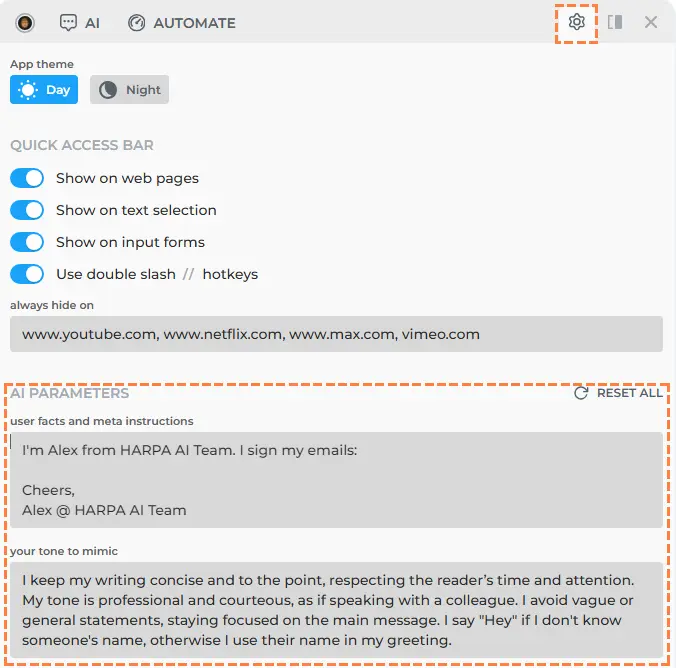
Please Open HARPA on any webpage, go to settings and configure your Tone of Voice and User information. Here's an example of instructions that can help AI write better emails: